
Overview
You can request to cancel any of your active services directly from the Nocser.net client area. Follow the steps below.
Steps to Cancel
- Login to your client area at https://www.nocser.net/clients/
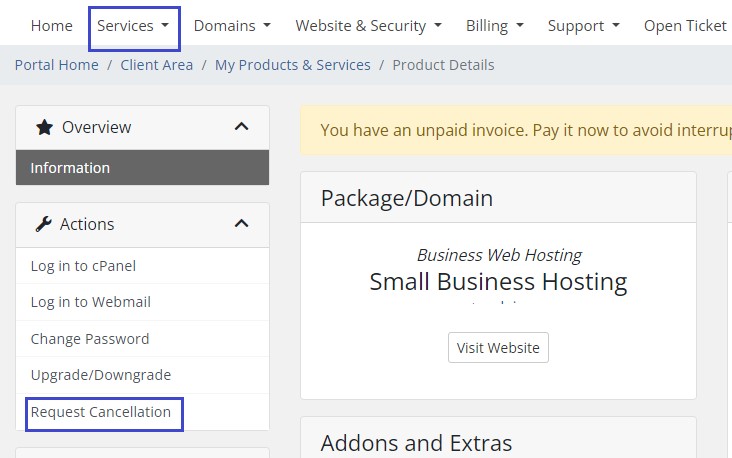
- Click Services → My Services
- Find the service you wish to cancel and click on it
- On the left menu, click Request Cancellation
- Follow the on-screen instructions to complete your request
Important Notes
- Cancellation is not instant — Your service will remain active until the end of the current billing period, or on the date you specify.
- Choose the right cancellation type:
- Immediate — Service is terminated right away (no refund for unused time).
- End of Billing Period — Service stays active until the due date, then terminates.
- Outstanding invoices must be paid before cancellation is processed.
- Backup your data before cancelling — all files, emails, and databases will be permanently deleted after termination.
- Domain names are separate — cancelling a hosting plan does not cancel your domain registration. Cancel domains separately if needed.
What Happens After Cancellation
- You will receive a confirmation email once the cancellation is processed.
- Services cancelled at end of billing period will not generate new invoices.
- All data will be permanently removed after termination — we cannot recover it.
Need Help?
If you're unsure which service to cancel or need assistance, open a support ticket before submitting the cancellation request.